How Do I Create An Online Membership Card?
Today, more brands and organizations are transitioning to online membership cards, and for good reason. Digital membership cards streamline access, reduce environmental impact, and offer real-time updates that physical cards simply can’t. However, creating print membership cards or effective online membership cards requires thoughtful planning, the right tools, and a user-centric approach to make sure the card reflects your brand and adds value for members.
Why Online Membership Cards Matter
Switching to online membership cards is more than just a trend; it’s a modern, efficient way to connect with members. Here’s why going digital with your custom member cards is worth the investment:
- Instant Access: Members can pull up their card from any device, anywhere, reducing the need to carry or remember a physical card.
- Eco-Friendly: Digital cards reduce the demand for plastic and paper, aligning with eco-conscious values.
- Real-Time Updates: Easily adjust membership levels, benefits, or expiration dates without the hassle of reprinting.
- Cost Savings: No need to pay for printing, shipping, or reissuing lost cards.
- Engagement and Interaction: Digital cards allow for interactive features, such as QR codes, links, and notifications, keeping members engaged with updates and offers.
Step 1: Choose the Right Platform for Your Print Membership Card
Selecting the right platform is the foundation of the design process, especially since each offers unique features and integrations. Here’s a quick comparison of popular options:
| Platform | Description | Best For |
| Canva | An intuitive design tool with ready-made templates for digital cards. | Small businesses, beginners |
| Adobe Express | High-quality design features suited for professionals needing full customization. | Professional designs, branding |
| Vistaprint | Known for print services, also offers online options for creating digital cards. | Organizations with printing needs |
| MemberPlanet | An all-in-one membership management tool with integrated card creation. | Large networks, organizations |
| Zoho Creator | A low-code tool allowing customized cards connected to databases for real-time updates. | Scalable, custom integrations |
Step 2: Plan Your Membership Card’s Content and Design
The design and information on your membership card reflect your brand and create the first impression for new members. Consider these elements to ensure the card is both useful and visually appealing:
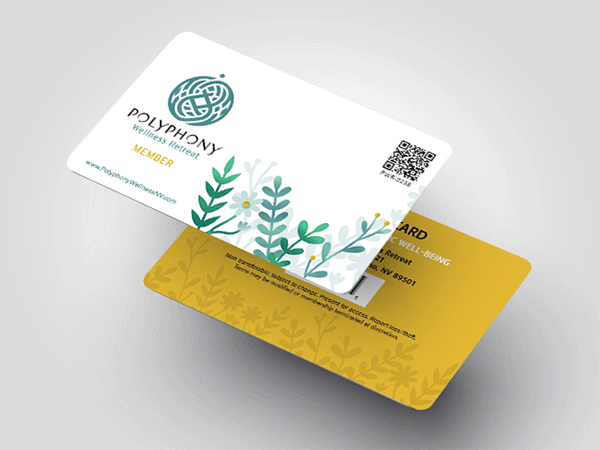
Essential Content for Custom Member Cards
- Member’s Name and ID: Unique identifiers help with quick verification.
- Membership Level: Indicates the tier of membership (e.g., Bronze, Silver, Gold) if applicable.
- Expiration Date: Clearly state the validity period or expiration date.
- Brand Logo and Colors: Establish brand identity and recognition through consistent visuals.
- Contact Information: Include customer support details for member inquiries.
- QR Code or Barcode: This feature makes it easy to scan the card for event entry, rewards, or access.
- Member Benefits: Highlight perks, discounts, or access levels associated with each membership tier.
- Social Media Links (Optional): Encourage engagement by including links to your social channels.
Design Tips to Ensure an Effective Membership Card
- Minimalism: Use a clean, simple design that prioritizes essential information and avoids overcrowding.
- Readable Fonts: Choose font sizes and styles that are easy to read on screens of all sizes.
- Brand Colors: Ensure your card aligns with your brand’s color palette for visual consistency.
- Contrasting Colors: Make text stand out against the background for readability.
Step 3: Design Your Membership Card
Designing the card is where you bring together branding elements and key information. Follow these steps to design a standout membership card using popular tools:
- Canva: Search “membership card” to find and customize templates. Add your brand’s logo, select color themes, and edit text to reflect your membership levels.
- Adobe Express: Offers more flexibility in design. Start with a template and tailor the design with brand-specific icons, imagery, and colors.
- Zoho Creator: Connect your membership database to create a dynamic, data-driven card that updates automatically with changes in member information.
Using templates can save you time and offer professional designs without requiring advanced skills.
Step 4: Distribute the Digital Membership Card to Members
After creating the card, you need to ensure members can access it effortlessly. Here are some distribution methods:
- Email Delivery: Send the digital card as an image or PDF attachment in a welcome email. Most platforms offer downloadable formats like JPG, PNG, or PDF.
- App Integration: Many membership management tools support mobile apps, allowing members to view their cards on the go.
- QR Code Integration: Link the membership card to a unique QR code, making access simple and secure.
- Member Portal Access: If you have a member portal, add the card as a feature in member profiles for easy access and updates.
Request a free sample of our custom membership cards today! Discover the superior quality and durability before you make your choice.
Step 5: Offer a Print Option for Those Who Prefer Physical Cards
While digital cards are versatile, some members might still prefer a printed version. Here’s how to make your card print-friendly:
Tips for Print-Ready Membership Cards
- Resolution: Design the card at 300 DPI for high-quality printing.
- Bleed and Trim Margins: Allow a small margin around the edges to avoid cutting off any text or design elements.
- Print Size: Standard card dimensions are 3.375 x 2.125 inches (similar to a credit card).
Step 6: Implement Security Features
Digital membership cards can incorporate advanced security features to prevent unauthorized access and ensure members feel safe using them.
Recommended Security Measures
- QR Codes or Barcodes: QR codes allow secure access for events, check-ins, or discounts with quick scanning.
- Verification: A password or PIN can secure online access to the card, especially if tied to member benefits.
- Expiration Alerts: Automated renewal reminders can prevent expired access while helping members stay updated on their membership status.
Step 7: Testing and Gathering Feedback Before the Full Rollout
Before releasing the digital card to your entire member base, a testing phase helps catch any potential issues and ensures smooth integration. Here’s a checklist to guide testing:
Testing Checklist
- Functionality: Ensure any QR codes or barcodes link to the correct information or website.
- Readability: Verify that text and graphics are clear across different devices (smartphones, tablets, laptops).
- Compatibility: Test the card on multiple devices and browsers to check for any display issues.
- User Feedback: A small sample of members can provide feedback on usability, design, and ease of access.
Step 8: Manage and Update Membership Information with Tracking Tools
Keeping your membership card up to date with accurate information is essential for member satisfaction and streamlined operations.
Recommended Tools for Managing and Tracking
- Google Analytics: If you offer access through a portal or app, track member interactions and activity.
- Member Management Software: Systems like Wild Apricot and MemberPlanet make it easy to manage renewals, tier upgrades, and real-time updates.
- Push Notifications: Send reminders or updates via notifications on mobile devices, keeping members informed of benefits or expirations.
Read Also: What Are The Benefits Of Using Key Tags In Businesses?
Extra Tips for an Effective Digital Membership Card
- Frequent Updates: Keep member benefits and perks up to date on the digital card to maximize value.
- Social Engagement: Consider adding links or social badges that encourage members to share and engage with your brand on social media.
- Regular Feedback Collection: Gather feedback regularly from members to keep improving the card’s design and functionality.
Final Thoughts
Creating online membership cards can seem complex, but each step you take ensures a smoother, more user-friendly experience for members. For businesses, they’re a versatile, scalable solution that meets today’s demands while maintaining high engagement with members.
Tired of replacing cards that just don’t last?
Duracard is built differently, made to endure daily handling without fading or fraying. It’s more than just a card as it’s a reliable extension of your brand.